From a recent BayLisa meeting, in which the speaker failed to arrive, the topic of the night was "Cloud Computing". The first order of business was to define its meanings.
The moderator started by asking if anyone had direct experience in this or similar. I started by stating I had worked in a video-over-the-internet business in the late 90s. Then stated that "cloud computing" was marketing hype.
To make this short, this is the best definition I could write down:
Cloud Computing
Either a high-speed on-demand distributed or a high-speed on-demand clustered computing with invisible redundancy. The best uses to date appear to be optical recognition, and audio recognition. In addition, there are working businesses very reminiscent of "Thin Computing".
ORA-24123 feature "dbaday" is not yet implemented

24123, 00000, "feature %s is not yet implemented"
// *Cause: An attempt was made to use the specified feature, but the feature is
// not yet implemented.
// *Action: Do not attempt to use the feature.
//
What is not obvious is "what the error is". What has happend is scp tries to match to a local name when infact the intent is to match a remote name. Remove the wildcard (*) and all will be good.
Given enough time most Internet servers will crash. It could be a memory leak, or some unexpected behavior from a new browser, or a deliberate denial of service attack. It could even be from hardware problems such a flaky memory chips.
The question is how do you deal with this.
If you take your basic C/C++ TCP/IP server application, when it dies it dies.
Many people set up some mechanism to monitor it and page a technician to restart it. This has many drawbacks and can lead to periods of prolonged downtime if alerts are missed or crashes become frequent.
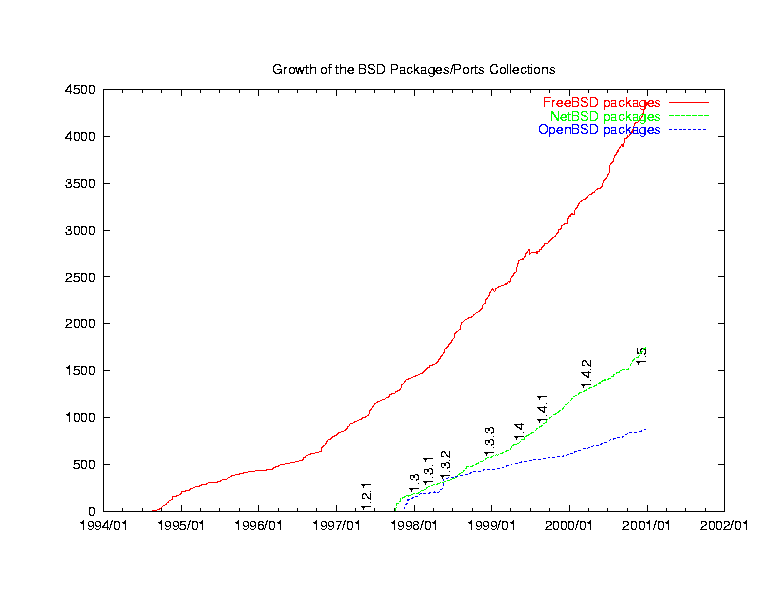
Web servers only became reliable when NCSA 1.4.1 came it. It was very well thought out and well written and most web service since have copied the mechanisms it used. NCSA used a parent process that spawn child processes to actually do the work. When a child process dies, the parent wakes up and immediately restarts them.
In my former company IBS(Internet Broadcast Systems) and later at DVBS (Digital Video Broadcast systems) we called this a keep_alive.
The simplest example can be a shells script.
while true
do
server
echo "server crashed" > log
sleep 1
done
With in C server code
int main(int argc, char *argv[])
{

    printf("Started...\n");

...

  Refork:
    switch (pid = fork()) {
    case -1:
 printf("\nCan't fork!\n");
 FatalError(3);
    case 0:
 break;
    default:
 wait(0);
 printf("\nChild died!\n");
 goto Refork;
    }

    printf("Forked...\n");
Looks like it's build on a stock Linux Kernel.. I was thinking about this and they need to get ride of the paradigm of a process and replace it.
Processes have there own time slices and memory. They seems to have spend a lot of effort to give each browser tab it's own process, and in some circumstances they could not.
What they need to do it get rid of the whole concept and go with an object based memory model.
Where some objects are shared between processes where processes are not sandboxed memory as much as just time slices and sandboxed memory objects associated with parent objects.
An article at Gamasutra provides some details on the hardware Mythic uses to power Warhammer Online, courtesy of Chief Technical Officer Matt Shaw and Online Technical Director Andrew Mann. Quoting: "At any given time, approximately 2,000 servers are in operation, supporting the gameplay in WAR. Matt Shaw commented, 'What we call a server to the user, that main server is actually a cluster of a number of machines. Our Server Farm in Virginia, for example,' Mann said, 'has about 60 Dell Blade chassis running Warhammer Online — each hosting up to 16 servers. All in all, we have about 700 servers in operation at this location.' ... 'We use blade architecture heavily for Warhammer Online,' Mann noted. 'Almost every server that we deploy is a blade system. We don't use virtualization; our software is somewhat virtualized itself. We've always had the technology to run our game world across several pieces of hardware. It's application-layer clustering at a process level. Virtualization wouldn't gain us much because we already run very close to peak CPU usage on these systems.' ... The normalized server configuration — in use across all of the Mythic-managed facilities — features dual Quad-Core Intel Xeon processors running at 3 GHz with 8 GB of RAM."
Why Coder Pay Isn't Proportional To Productivity "John D. Cook takes a stab at explaining why programmers are not paid in proportion to their productivity. The basic problem, Cook explains, is that extreme programmer productivity may not be obvious. A salesman who sells 10x as much as his peers will be noticed, and compensated accordingly. And if a bricklayer were 10x more productive than his peers, this would be obvious too (it doesn't happen). But the best programmers do not write 10x as many lines of code; nor do they work 10x as many hours. Programmers are most effective when they avoid writing code. An über-programmer, Cook explains, is likely to be someone who stares quietly into space and then says 'Hmm. I think I've seen something like this before.'"
"An open source project, Ocelot, has recently released a just-in-time compiler for CUDA, allowing the same programs to be run on NVIDIA GPUs or x86 CPUs and providing an alternative to OpenCL. A description of the compiler was recently posted on the NVIDIA forums. The compiler works by translating GPU instructions to LLVM and then generating native code for any LLVM target. It has been validated against over 100 CUDA applications. All of the code is available under the New BSD license."
Upon setting up FreeBSD 7.2 from 6.4, I though that unrolling the tarball would do it. I did copy xorg.conf to /etc/X11, but no luck. I then read the error log (/var/log/Xorg.0.log). After a search on wiki.x.org, I did see a reference on to how to TURN OFF all keyboard and mouse input by adding to the Section "ServeFlags"
The bash fork() bomb :(){ :|:& };: This is a bash function. It gets called recursively (recursive function). This is most horrible code for any Unix / Linux box. It is often used by sys admin to test user processes limitations (Linux process limits can be configured via /etc/security/limits.conf and PAM).
Once a successful fork bomb has been activated in a system it may not be possible to resume normal operation without rebooting, as the only solution to a fork bomb is to destroy all instances of it.
Understanding :(){ :|:& };: fork() bomb code
:() - It is a function name. It accepts no arguments at all. Generally, bash function is defined as follows:
foo(){ arg1=$1 echo '' #do_something on $arg argument }
fork() bomb is defined as follows:
:(){ :|:& };:
:|: - Next it call itself using programming technique called recursion and pipes the output to another call of the function ':'. The worst part is function get called two times to bomb your system.
& - Puts the function call in the background so child cannot die at all and start eating system resources.
; - Terminate the function definition
: - Call (run) the function aka set the fork() bomb.
When did this happen? I am finally getting around to developing a mac app. I wanted to use SDL and they had a great ports collection apparently http://darwinports.opendarwin.org/ that is now GONE! Shit.
OpenDarwin was originally created with the goal of providing a development environment for building and developing Mac OS X sources as well as developing a standalone Darwin OS derivative. OpenDarwin was meant to be a development community and a proving ground for fixes and features for Mac OS X and Darwin, which could be picked up by Apple for inclusion in the canonical sources. OpenDarwin has failed to achieve its goals in 4 years of operation, and moves further from achieving these goals as time goes on. For this reason, OpenDarwin will be shutting down.
Over the past few years, OpenDarwin has become a mere hosting facility for Mac OS X related projects. The original notions of developing the Mac OS X and Darwin sources has not panned out. Availability of sources, interaction with Apple representatives, difficulty building and tracking sources, and a lack of interest from the community have all contributed to this. Administering a system to host other people's projects is not what the remaining OpenDarwin contributors had signed up for and have been doing this thankless task far longer than they expected. It is time for OpenDarwin to go dark.
Project admins for all active projects have been notified, and we will be working with them to provide as seamless a transition to their new homes as possible. We don't want to boot anyone off, we will be operating the machines as usual for several months, until everyone has had a chance to move elsewhere.
We will continue to provide email and dns redirection after the machines go dark. We'll be looking at what other redirection services are needed and can be provided after hosting has ceased.
The OpenDarwin team would like to thank everyone who did contribute to the project, and our apologies to active, loyal projects that have to move.
Thanks,
- OpenDarwin Core Team and Administrators
If you have already setup an ssh connection to your remote machine, then getting the X11 client application (on the remote) to show up on your (local) diplay is easy.
CAVEAT: THIS IS THE INSECURE METHOD THE SSH PEOPLE ARE ALWAYS WARNING ABOUT.
Before you login to the remote machine make sure your X11 server (Note: the server runs the display, not the programs, clients, or applications.), make sure it is listening for TCP connections. MANY X11 display managers have this turn OFF by default, John has shown how to do this in his article for gdm (gnome)
I use icewm, so I just use startx(1). As such, the following is at the end of my .login file.
echo Starting X in 3 seconds sleep 3 startx -listen_tcp
Next, login to the remote machine and at the commandline enter:
$ export DISPLAY=192.168.123.100:0.0
then test your connection with
$ xterm
Then rather than hardcode the display add the following to your .chsrc or .bashrc file:
    if [ -n "$SSH_CLIENT" ]
    then
        X=`echo $SSH_CLIENT | cut -f 1 -d " "`
        # The insecure way
        #export  DISPLAY=$X:0.0
        # The secure way
        if [ "$X" = "192.168.123.100" ]
        then
            export DISPLAY=127.0.0.1:1
        fi
        #echo X $X
    fi
NOTE #1: Substitute your domainname or your IP for 192.168.123.100.
NOTE #2: Your SSH shell/terminal will not close, if you have an X application running the secure way.
NOTE #3: This method is extremely useful, if you have control of your firewall.
Thomas Edison = ATOMS DO SHINE
Albert Einstein = TEN ELITE BRAINS
Microsoft = IS COMFORT
Microsoft Windows = I'D WOW CONFORMISTS
Microsoft Windows Xp = WORM DOWNS PC, SO FIX IT
Microsoft Word = IFORMWORST.DOC
Microsoft Office = IS OF COMIC EFFORT
Microsoft Vista = FASCIST OR VOMIT
Microsoft Windows Vista = OVATIONS WORM SWIFT DISC
Microsoft Windows seven = NOW SNOW-COVERED MISFITS
Sun Microsystems = COSTS MESS - MY RUIN
Sunsoft = NOT FUSS
Freebsd Unix = BURNED FIXES
Netbsd unix = BID NEXT SUN
Openbsd Unix = INDEX UP SNOB
Berkeley System Distribution = TRUSTILY. BEE'S KNEES MORBIDITY
Berkeley Software Distribution = SWEATIEST OR BROKENLY BRUTIFIED
Gnu's Not Unix = UNSUNG TOXIN & SIX GUN ON NUT
Sourceforge = OGRE OF CURSE & FORCE ROGUES
Debian Linux = I ANNEX BUILD
Redhat Linux OS = Dear! Lush Toxin = IN HOARD EXULTS
Fedore Core OS = FREE CODE OR SO
Fedore Core Linux = IF DELUXE CROONER
Linus Torvalds = STUN AVID ROLLS
Public Domain = BULIMIAC POND
Free Open Source = UP OF SERENE CORE & OPENER OF SECURE
Free Open Source Software = SUFFOCATE OR SERENE POWER & NOW USE CAREFREE POOFTERS
Free Software Foundation = NOW OF SNUFFIER TOADEATER & WORN-OUT IF TONE-DEAF FEARS
-- TOADEATER [Originally, a charlatan's helper who ate (or pretended to eat) poisonous toads so that his employer could display his prowess in expelling the poison.]
Internet Guru = TURGENT URINE
World Wide Web = BORED, IDLE? - "W.W.W."
Web Surfing = IF SNUB GREW & WIN SERF BUG
Network Solutions = NOW STINK OUT LOSER
Internic = IN CRETIN
Internet protocol = COOL! NOT INTERPRET
Internet Protocol Version Six = INTROVERT CORNIEST EXPLOSION & SO INEXPERT SILVER CONTORTION
Domain Registry Service = REVENGES TRIM IDIOCRASY & I'M ANGRIEST RE-DISCOVERY
Boarder Gateway Protocol = COWPAT OR DEROGATORY ABLE
Secure Shell = HER CLUELESS
Universal Serial Bus = ILLUSIVE AS RARE SNUB
The C Programming Language = CLEAN RAMPAGING TOUGH GERM & GLEAM HOT GRUMPING CARNAGE
T One Line = NON-ELITE
Co Location = COOL ACTION!
Server Room = ERRORS MOVE
Beowulf Cluster = WE'LL BRUTE FOCUS
Relational Database = INALTERABLE AS A TOAD
High Definition Television = OH NO! THIEVING INFIDELITIES
Music Television = SIT, VOLUME IS NICE
Blue Ray Disk = IS BULKY DEAR
Silicon Valley = SOCIAL 'N' LIVELY & Villainy Close
American Telephone And Telegraph = REPELLANT MEATHEAD OR CHEAPENING & THE PAEDOPHILE, CLEAN ARRANGEMENT
Pacific Bell = IF CLIP CABLE
Computational Chemistry = PSYCHOTIC, MEAN MUTILATOR
high speed internet = EIGHTH SERPENTINED
This is really interesting in many mythologies. Gnostic, Hundu, Egyptian, Japaneses
Now to really blow your mind!
If your wondering how some of these anagrams ring true then think about these anagrams
Who Is Answering This? = A WRITHING SHOWINESS & WIN SINISTER HOGWASH
Messages In Anagrams = A MASSAGER MANGINESS
massage is to manipulate
manginess is defined as Mean; contemptible
Before we can get started you must enable your local X Server to recieve from the network.
To do this in Linux in edit /etc/X11/gdm/gdm.conf
Change:
#DisallowTCP=true DisallowTCP=false
You will need to reboot your Linux box or restart the X-server which is more then I care to try to explain here.
ssh -R 6001:127.0.0.1:6000 sokol@remote.host.name
sokol@192.168.1.116's password: xxxxx Last login: Fri Apr 1 12:04:48 2005 from 192.168.1.108
[sokol@localhost ~]$ xterm -display 127.0.0.1:1
-- THEN an Xterm will pop-up on your local machine.
If you install cygwin on your windows PC this will also work using the X server in cygwin, or my favorate is using Hummingbird Exceed ( I have an ancient copy I use) on windows but over the ssh on Cygwin
Works great. I can run synaptic remotely and almost all X-apps that don't do high end graphics like games or video.


 - Videos of conferences