Monday, June 15, 2020
C++ Today: The Beast is Back - Jon Kalb [ACCU 2018]
I made the book available at : http://c-program.com/cpp/
This presentation will cover why engineers looking for performance choose C++. I will present a historical perspective of C++ focusing on what’s going on in the C++ community right now and where the language and its user base is heading. With a renewed interest in performance for both data centers and mobile devices, and the success of open source software libraries, C++ is back and it is hot. This presentation will explain why C++ is most software engineers' go-to language for performance. You will receive a rough historical sketch that puts C++ in perspective and covers its popularity ups and downs.
This talk is based, in part, on the book "C++ Today: The Beast is Back" published by O’Reilly.


Sunday, June 14, 2020
VT100 Animations
https://www.ibiblio.org/archive/2020/04/vt100-animations/
Our ibiblio files include some of these neat VT100 animations (https://www.ibiblio.org/catalog/items/show/3566) that were made in the 1980’s and early 1990’s for the VT100 terminals . The animations were created by writing code that instructs characters to appear on the screen in a specific order and time. Nothing fancy, but fun to watch.
Assuming you don’t have a functioning VT100 terminal laying around to run these on, the next best thing is to run this in a Linux terminal using this pipe viewer , and this code:
curl -s [URL] | pv -q -L 2000
(thanks ). Replace that url with any from ibiblio’s vt100 collection here: http://www.ibiblio.org/pub/multimedia/animation/vt100-animation/ . Example:
curl -s ibiblio.org/pub/multimedia/animation/vt100-animation/dont-worry.vt | pv -q -L 2000
If you don’t have a Linux terminal you can run the code in your Mac terminal, leaving off the ‘|’ and everything after. The timing will be too fast, but you can see what it does. If you have Windows you can install a Linux app from the Microsoft store to run these.
You can find more .vt animation here: http://artscene.textfiles.com/vt100/
Tuesday, June 09, 2020
Wednesday, June 05, 2019
Tuesday, October 09, 2018
Wednesday, October 03, 2018
60 different systems for reaching Blockchain consen
60 different systems for reaching Blockchain consensus
Avalanche
Block-lattice - Directed Acyclic Graphs (DAGs)
Byzantine Fault Tolerance (BFT)
Delayed Proof of Work (dPoW)
Delegated Byzantine Fault Tolerance
Delegated proof-of-stake (DPoS)
Direct Acyclic Graph
Ethereum Proof of Authority
Federated Byzantine Agreement
High Interest Proof of Stake (HiPoS)
Hybrid Proof of Work (HPoW)
Leased Proof-of-Stake (LPoS)
Leasing Proof of Stake (PoS/LPoS)
LFT
Limited Confidence Proof-of-Activity
Magi's proof-of-stake (mPoS)
Magi's proof-of-work (mPoW)
Modified Federated Byzantine Agreement (mFBA)
Ouroboros
PoET
Practical Byzantine Fault Tolerance
Proof Of Activity
Proof of Believability
Proof of Burn (PoB)
Proof of Care (PoC)
Proof of Devotion
Proof of Existence
Proof of History
Proof of Identity (PoI)
Proof of Importance
Proof of Meaningful Work (PoMW)
Proof of Ownership
Proof of Participation (PoP)
Proof of Processed Payments (PoPP)
Proof of Quality (PoQ)
Proof of Reputation (PoR)
Proof of Research (DPoR)
Proof of Retrievability (POR)
Proof of Stake (PoS) / Proof of Disintegration (PoD)
Proof of stake (PoS)
Proof of stake Casper (PoS Casper)
Proof of stake Boo (PoS Boo)
Proof of Stake Velocity
Proof of Time
Proof of Value (PoV)
Proof of Work (PoW) / Nexus Proof of State (nPoS) or Nexus Proof of Holding (nPOH)
Proof of Work (PoW) / PoM / PoSII
Proof of Work (PoW) / Proof of Stake (PoS) / Proof Of Care (PoC)
Proof of Work (PoW)
Proof of Zero (PoZ)
Proof-of-authority (PoA)
Proof-of-Proof (PoP)
Proof-of-Signature (PoSign)
Proof-of-space (PoC)
Proof-of-Stake (POS) / Proof-of-Presence (PoP)
Proof-of-Stake-Time (PoST)
Proof-of-Weight (PoWeight)
Proof-of-work (PoW) / High Interest Proof of Stake (HiPoS)
Proof-of-work time (PoWT)
Raft
Scrypt-adaptive-N (ASIC resistant)
Serialization of Proof-of-work Events: Confirming Transactions via Recursive Elections
Tangle (DAG)
Traditional Proof of stake / Tiered Proof Of Stake (TPOS)
Variable Delayed Proof Of Stake (vDPOS)
Sent from my iPad
Wednesday, August 15, 2018
Tuesday, May 15, 2018
Monday, January 29, 2018
Are the BSDs dying? Some security researchers think so
Too few eyeballs on code is a security issue as vulnerabilities go unreported and unpatched. Can FreeBSD, OpenBSD, and NetBSD survive?
https://www.csoonline.com/article/3250653/open-source-tools/is-the-bsd-os-dying-some-security-researchers-think-so.html
Sunday, June 25, 2017
Fwd: [svlug] Intel Skylake/Kaby Lake processors: broken hyper-threading
Just re-sending this from the Debian User's list.... FYI
- originally from: "Henrique de Moraes Holschuh <hmh@debian.org>"
- are we all good here?
- NB: there is a nice perl script to check vuln too on that list
(I'll post that one here too)
This warning advisory is relevant for users of systems with the Intel
processors code-named "Skylake" and "Kaby Lake". These are: the 6th and
7th generation Intel Core processors (desktop, embedded, mobile and
HEDT), their related server processors (such as Xeon v5 and Xeon v6), as
well as select Intel Pentium processor models.
TL;DR: unfixed Skylake and Kaby Lake processors could, in some
situations, dangerously misbehave when hyper-threading is enabled.
Disable hyper-threading immediately in BIOS/UEFI to work around the
problem. Read this advisory for instructions about an Intel-provided
fix.
SO, WHAT IS THIS ALL ABOUT?
---------------------------
This advisory is about a processor/microcode defect recently identified
on Intel Skylake and Intel Kaby Lake processors with hyper-threading
enabled. This defect can, when triggered, cause unpredictable system
behavior: it could cause spurious errors, such as application and system
misbehavior, data corruption, and data loss.
It was brought to the attention of the Debian project that this defect
is known to directly affect some Debian stable users (refer to the end
of this advisory for details), thus this advisory.
Please note that the defect can potentially affect any operating system
(it is not restricted to Debian, and it is not restricted to Linux-based
systems). It can be either avoided (by disabling hyper-threading), or
fixed (by updating the processor microcode).
Due to the difficult detection of potentially affected software, and the
unpredictable nature of the defect, all users of the affected Intel
processors are strongly urged to take action as recommended by this
advisory.
DO I HAVE AN INTEL SKYLAKE OR KABY LAKE PROCESSOR WITH HYPER-THREADING?
------------------------------
The earliest of these Intel processor models were launched in September
2015. If your processor is older than that, it will not be an Skylake
or Kaby Lake processor and you can just ignore this advisory.
If you don't know the model name of your processor(s), the command below
will tell you their model names. Run it in a command line shell (e.g.
xterm):
grep name /proc/cpuinfo | sort -u
Once you know your processor model name, you can check the two lists
below:
* List of Intel processors code-named "Skylake":
http://ark.intel.com/products/
* List of Intel processors code-named "Kaby Lake":
http://ark.intel.com/products/
Some of the processors in these two lists are not affected because they
lack hyper-threading support. Run the command below in a command line
shell (e.g. xterm), and it will output a message if hyper-threading is
supported/enabled:
grep -q '^flags.*[[:space:]]ht[[:
echo "Hyper-threading is supported"
Alternatively, use the processor lists above to go to that processor's
information page, and the information on hyper-threading will be there.
If your processor does not support hyper-threading, you can ignore this
advisory.
WHAT SHOULD I DO IF I DO HAVE SUCH PROCESSORS?
------------------------------
Kaby Lake:
Users of systems with Intel Kaby Lake processors should immediately
*disable* hyper-threading in the BIOS/UEFI configuration. Please
consult your computer/motherboard's manual for instructions, or maybe
contact your system vendor's support line.
The Kaby Lake microcode updates that fix this issue are currently only
available to system vendors, so you will need a BIOS/UEFI update to get
it. Contact your system vendor: if you are lucky, such a BIOS/UEFI
update might already be available, or undergoing beta testing.
You want your system vendor to provide a BIOS/UEFI update that fixes
"Intel processor errata KBL095, KBW095 or the similar one for my Kaby
Lake processor".
We strongly recommend that you should not re-enable hyper-threading
until you install a BIOS/UEFI update with this fix.
Skylake:
Users of systems with Intel Skylake processors may have two choices:
1. If your processor model (listed in /proc/cpuinfo) is 78 or 94, and
the stepping is 3, install the non-free "intel-microcode" package
with base version 3.20170511.1, and reboot the system. THIS IS
THE RECOMMENDED SOLUTION FOR THESE SYSTEMS, AS IT FIXES OTHER
PROCESSOR ISSUES AS WELL.
Run this command in a command line shell (e.g. xterm) to know the
model numbers and steppings of your processor. All processors must
be either model 78 or 94, and stepping 3, for the intel-microcode fix
to work:
grep -E 'model|stepping' /proc/cpuinfo | sort -u
If you get any lines with a model number that is neither 78 or 94, or
the stepping is not 3, you will have to disable hyper-threading as
described on choice 2, below.
Refer to the section "INSTALLING THE MICROCODE UPDATES FROM NON-FREE"
for instructions on how to install the intel-microcode package.
2. For other processor models, disable hyper-threading in BIOS/UEFI
configuration. Please consult your computer/motherboard's manual for
instructions on how to do this. Contact your system vendor for a
BIOS/UEFI update that fixes "Intel erratum SKW144, SKL150, SKX150,
SKZ7, or the similar one for my Skylake processor".
NOTE: If you did not have the intel-microcode package installed on your
Skylake system before, it is best if you check for (and install) any
BIOS/UEFI updates *first*. Read the wiki page mentioned below.
INSTALLING THE MICROCODE UPDATES FROM NON-FREE:
------------------------------
Instructions are available at:
https://wiki.debian.org/
Updated intel-microcode packages are already available in non-free for:
unstable, testing, Debian 9 "stretch" (stable), and Debian 8 *backports*
(jessie-backports).
THE MICROCODE PACKAGES FROM THE RECENT STABLE RELEASE (June 17th, 2017)
ALREADY HAVE THE SKYLAKE FIX, BUT YOU MAY HAVE TO INSTALL THEM.
Updated intel-microcode packages in non-free for Debian 8 "jessie"
(oldstable) are waiting for approval and will likely be released in the
next non-free oldstable point release. They are the same as the
packages in non-free jessie-backports, with a change to the version
number.
The wiki page above has instructions on how to enable "contrib" and
"non-free", so as to be possible to install the intel-microcode package.
Users of "jessie" (oldstable) might want to enable jessie-backports to
get *this* intel-microcode update faster. This is also explained in the
wiki page above.
MORE DETAILS ABOUT THE PROCESSOR DEFECT:
------------------------------
On 2017-05-29, Mark Shinwell, a core OCaml toolchain developer,
contacted the Debian developer responsible for the intel-microcode
package with key information about a Intel processor issue that could be
easily triggered by the OCaml compiler.
The issue was being investigated by the OCaml community since
2017-01-06, with reports of malfunctions going at least as far back as
Q2 2016. It was narrowed down to Skylake with hyper-threading, which is
a strong indicative of a processor defect. Intel was contacted about
it, but did not provide further feedback as far as we know.
Fast-forward a few months, and Mark Shinwell noticed the mention of a
possible fix for a microcode defect with unknown hit-ratio in the
intel-microcode package changelog. He matched it to the issues the
OCaml community were observing, verified that the microcode fix indeed
solved the OCaml issue, and contacted the Debian maintainer about it.
Apparently, Intel had indeed found the issue, *documented it* (see
below) and *fixed it*. There was no direct feedback to the OCaml
people, so they only found about it later.
The defect is described by the SKZ7/SKW144/SKL150/SKX150/
Intel processor errata. As described in official public Intel
documentation (processor specification updates):
Errata: SKZ7/SKW144/SKL150/SKX150/
Short Loops Which Use AH/BH/CH/DH Registers May Cause
Unpredictable System Behavior.
Problem: Under complex micro-architectural conditions, short loops
of less than 64 instructions that use AH, BH, CH or DH
registers as well as their corresponding wider register
(e.g. RAX, EAX or AX for AH) may cause unpredictable
system behavior. This can only happen when both logical
processors on the same physical processor are active.
Implication: Due to this erratum, the system may experience
unpredictable system behavior.
We do not have enough information at this time to know how much software
out there will trigger this specific defect.
One important point is that the code pattern that triggered the issue in
OCaml was present on gcc-generated code. There were extra constraints
being placed on gcc by OCaml, which would explain why gcc apparently
rarely generates this pattern.
The reported effects of the processor defect were: compiler and
application crashes, incorrect program behavior, including incorrect
program output.
What we know about the microcode updates issued by Intel related to
these specific errata:
Fixes for processors with signatures[1] 0x406E3 and 0x506E3 are
available in the Intel public Linux microcode release 20170511. This
will fix only Skylake processors with model 78 stepping 3, and model 94
stepping 3. The fixed microcode for these two processor models reports
revision 0xb9/0xba, or higher.
Apparently, these errata were fixed by microcode updates issued in early
April/2017. Based on this date range, microcode revision 0x5d/0x5e (and
higher) for Kaby Lake processors with signatures 0x806e9 and 0x906e9
*might* fix the issue. We do not have confirmation about which
microcode revision fixes Kaby Lake at this time.
Related processor signatures and microcode revisions:
Skylake : 0x406e3, 0x506e3 (fixed in revision 0xb9/0xba and later,
public fix in linux microcode 20170511)
Skylake : 0x50654 (no information, erratum listed)
Kaby Lake : 0x806e9, 0x906e9 (defect still exists in revision 0x48,
fix available as a BIOS/UEFI update)
References:
https://caml.inria.fr/mantis/
http://metadata.ftp-master.
https://www.intel.com/content/
https://www.intel.com/content/
https://www.intel.com/content/
https://www.intel.com/content/
https://www.intel.com/content/
[1] iucode_tool -S will output your processor signature. This tool is
available in the *contrib* repository, package "iucode-tool".
--
Henrique Holschuh
______________________________
Dng mailing list
Dng@lists.dyne.org
https://mailinglists.dyne.org/
Date: Mon, 26 Jun 2017 03:08:51 +1000
>From dng-bounces@lists.dyne.org Sun Jun 25 10: 1:39 2017
From: Andrew McGlashan <andrew.mcglashan@affinityvision.com.au>
To: Devuan DNG <dng@lists.dyne.org>
Subject: Re: [DNG] [WARNING] Intel Skylake/Kaby Lake processors: broken
hyper-threading
Just re-sending this from the Debian User's list.... FYI
- originally from: "Henrique de Moraes Holschuh <hmh@debian.org>"
- this email with the perl script....
(I'll post that one here too)
On Sun, 25 Jun 2017, Henrique de Moraes Holschuh wrote:
> This warning advisory is relevant for users of systems with the Intel
> processors code-named "Skylake" and "Kaby Lake". These are: the 6th and
> 7th generation Intel Core processors (desktop, embedded, mobile and
> HEDT), their related server processors (such as Xeon v5 and Xeon v6), as
> well as select Intel Pentium processor models.
Attached, you will find a perl script that can help detect if your
system is affected or not. Many thanks to Uwe Kleine-K\303\266nig for
suggesting, and writing this script.
--
Henrique Holschuh
detect-skl150.pl:
#!/usr/bin/perl
# Copyright 2017 Uwe Kleine-K?nig
#
# This program is free software; you can redistribute it and/or modify it under
# the terms of the GNU General Public License version 2 as published by the
# Free Software Foundation.
open(my $cpuinfo, "</proc/cpuinfo") or die "failed to open cpuinfo\n";
my $cpunum, $vendor, $family, $model, $stepping, $microcoderev, $hyperthreading;
while (<$cpuinfo>) {
if (/^$/) {
print "cpu $cpunum: ";
if ($vendor eq "GenuineIntel" and $family == 6) {
if ($model == 78 or $model == 94) {
if ($stepping eq "3") {
print "Your CPU is affected, ";
if (hex($microcoderev) >= 0xb9) {
print "but your microcode is new enough\n";
} elsif ($hyperthreading ne "on") {
print "but hyper threading is off, which works around the
+problem\n";
} else {
print "you should install the latest intel-microcode\n";
}
} else {
print "You may need a BIOS/UEFI update (unknown Skylake-Y/H/U/S stepping)\n";
}
} elsif ($model == 85 or $model == 142 or $model == 158) {
print "You may need a BIOS/UEFI update (Kaby Lake, or Skylake-X processor)\n";
} else {
print "You're likely not affected\n";
}
} else {
print "You're not affected\n";
}
$cpunum = undef;
$vendor = undef;
$family = undef;
$stepping = undef;
$microcoderev = undef;
$hyperthreading = undef;
next;
}
$cpunum = $1 if /^processor\s*:\s(.*)/;
$vendor = $1 if /^vendor_id\s*:\s(.*)/;
$family = $1 if /^cpu family\s*:\s(.*)/;
$model = $1 if /^model\s*:\s(.*)/;
$stepping = $1 if /^stepping\s*:\s(.*)/;
$microcoderev = $1 if /^microcode\s*:\s(.*)/;
if (/^flags\s*:/) {
if (/^flags\s*:.*\bht\b/) {
$hyperthreading = "on";
} else {
$hyperthreading = "off";
}
}
}
______________________________
Dng mailing list
Dng@lists.dyne.org
https://mailinglists.dyne.org/
______________________________
svlug mailing list
svlug@lists.svlug.org
http://lists.svlug.org/lists/
Wednesday, June 14, 2017
Saturday, June 10, 2017
Monday, June 05, 2017
Fwd: vim | Word of the Day
|


| QUOTES |
| Certainly no better selection of a leader could have been made, for Neil was full of the vim of youth, and had a newly acquired fund of scientific knowledge just waiting to be applied. -- Caroline Abbot Stanley, The Keeper of the Vineyard, 1913 |
| ORIGIN |
| Vim began as an American colloquialism but became standard on both sides of the Atlantic within a generation. It is the accusative singular of the irregular Latin noun vīs (stem vīr-) "power, force." Latin vīs is related to the Latin noun vir "man (i.e., a male person), husband." The same Proto-Indo-European root wir-, wīr- in Latin vir appears in English wergild and werewolf. Vim entered English in the mid-19th century. |
 |  |  |  |  |  |  |  |  |  |  |  |

Wednesday, May 31, 2017
Tuesday, February 14, 2017
Automotive Grade Linux (AGL)
https://www.automotivelinux.org/
A Linux Foundation project dedicated to creating open source software solutions for automotive applications.
A Linux Foundation project dedicated to creating open source software solutions for automotive applications.
Sunday, November 06, 2016
Sunday, April 24, 2016
Thursday, December 03, 2015
Wednesday, November 25, 2015
Tuesday, October 13, 2015
Wednesday, September 30, 2015
Wednesday, September 23, 2015
Monday, September 07, 2015
Wednesday, July 08, 2015
Saturday, June 27, 2015
Wednesday, June 17, 2015
Reverse Engineering Chinese phones from Gongkai to Open Source « bunnie's blog
Read and watch this video at the end.
They are reverse engineering Chinese phones
Fernvale: An Open Hardware and Software Platform, Based on the Closed-Source MT6260 SoC [31c3]
https://www.youtube.com/watch?v=msrTR3hNDQM#t=33
Gongkai to Open Source « bunnie's blog
http://www.bunniestudios.com/blog/?p=4297
Saturday, June 06, 2015
Thursday, May 28, 2015
Sunday, May 17, 2015
Thursday, May 07, 2015
Wednesday, April 08, 2015
Sunday, April 05, 2015
Monday, January 26, 2015
Intel Curie module

http://www.intel.com/content/www/us/en/wearables/wearable-soc.html
Key Features
• A low-power, 32-bit Intel® Quark™ SE SoC
• 384kB Flash memory, 80kB SRAM
• A low-power integrated DSP sensor hub with a proprietary pattern matching accelerator
• Bluetooth* Low Energy
• 6-axis combo sensor with accelerometer and gyroscope
• Battery charging circuitry (PMIC)
Monday, January 19, 2015
Saturday, January 17, 2015
Tuesday, December 30, 2014
Parkinson's law of triviality, also known as bikeshedding, bike-shed effect
http://en.wikipedia.org/wiki/Parkinson's_law_of_triviality
Parkinson's law of triviality, also known as bikeshedding, bike-shed effect, or the bicycle-shed example, is C. Northcote Parkinson's 1957 argument that organizations give disproportionate weight to trivial issues.[1] Parkinson observed and illustrated that a committee whose job is to approve plans for a nuclear power plant spent the majority of its time with pointless discussions on relatively trivial and unimportant but easy-to-grasp issues, such as what materials to use for the staff bike-shed, while neglecting the less-trivial proposed design of the nuclear power plant itself, which is far more important but also a far more difficult and complex task to criticize constructively.
The law has been applied to software development[2] and other activities, and the term "bikeshedding" was coined as a metaphor to illuminate Parkinson's Law of Triviality and was popularized in the Berkeley Software Distribution community by Poul-Henning Kamp[3] and has spread from there to the software industry at large.
Monday, December 29, 2014
Wednesday, December 17, 2014
Sony Leaks Reveal Hollywood Is Trying To Break DNS
Sony Leaks Reveal Hollywood Is Trying To Break DNS
from the scorched-net-policy dept.
schwit1 sends this report from The Verge:Most anti-piracy tools take one of two paths: they either target the server that's sharing the files (pulling videos off YouTube or taking down sites like The Pirate Bay) or they make it harder to find (delisting offshore sites that share infringing content). But leaked documents reveal a frightening line of attack that's currently being considered by the MPAA: What if you simply erased any record that the site was there in the first place? To do that, the MPAA's lawyers would target the Domain Name System that directs traffic across the internet.
The tactic was first proposed as part of the Stop Online Piracy Act (SOPA) in 2011, but three years after the law failed in Congress, the MPAA has been looking for legal justification for the practice in existing law and working with ISPs like Comcast to examine how a system might work technically. If a takedown notice could blacklist a site from every available DNS provider, the URL would be effectively erased from the internet. No one's ever tried to issue a takedown notice like that, but this latest memo suggests the MPAA is looking into it as a potentially powerful new tool in the fight against piracy.
The tactic was first proposed as part of the Stop Online Piracy Act (SOPA) in 2011, but three years after the law failed in Congress, the MPAA has been looking for legal justification for the practice in existing law and working with ISPs like Comcast to examine how a system might work technically. If a takedown notice could blacklist a site from every available DNS provider, the URL would be effectively erased from the internet. No one's ever tried to issue a takedown notice like that, but this latest memo suggests the MPAA is looking into it as a potentially powerful new tool in the fight against piracy.
Sunday, December 14, 2014
Richard Feynman and The Connection Machine - The Long Now
If you found your way here, you must watch this talk.
- john
http://longnow.org/essays/richard-feynman-connection-machine/
- john
http://longnow.org/essays/richard-feynman-connection-machine/
Wednesday, December 10, 2014
www.charlespetzold.com/blog/2014/12/The-Infamous-Windows-Hello-World-Program.html
http://www.charlespetzold.com/blog/2014/12/The-Infamous-Windows-Hello-World-Program.html
I remember struggling with this.
Sent from my iPad
I remember struggling with this.
Sent from my iPad
Tuesday, December 09, 2014
PiDuino kit
This PiDuino kit is an add on board for the Raspberry Pi.
It enables the Pi to have real-time and analog capabilities. Powered by an Atmega328 at 3.3v 8MHz.
http://skpang.co.uk/catalog/piduino-kit-p-1337.html
It enables the Pi to have real-time and analog capabilities. Powered by an Atmega328 at 3.3v 8MHz.
http://skpang.co.uk/catalog/piduino-kit-p-1337.html
Sunday, December 07, 2014
UNIX: Making Computers Easier To Use -- AT&T Archives film from 1982, Be...
Just ran across this gem.
For more from the AT&T Archives, visit http://techchannel.att.com/archives
The Unix System: Making Computers Easier to Use - 1982
This 23-minute film about UNIX was designed for students with an interest in engineering, math, computer science or other sciences. The film was made available to the public in December 1982. It covers different ways that UNIX could be employed practically in a computing environment. Another film about UNIX released at the same time, "The UNIX System: Making Computers More Productive," was aimed at computer science majors and corporate trainees, and presented a more detailed discussion of the UNIX system and its various applications.
Hosted by Victor Vyssotsky in a Carl-Sagan-esque turtleneck sweater, this film includes Dennis Ritchie, one of UNIX's inventors, along with Bell Labs staffers and programmers Brian Kernighan, Catherine Ann Brooks, Lorinda Cherry, Alfred Aho, Nina Macdonald, and John Mashey.
Dennis Ritchie and Ken Thompson started work on what would become UNIX originally in 1969. They developed it to run on a DEC PDP-7 to begin with; it would eventually be ported to other computers. By 1976, UNIX was used in more than 30 Bell Labs groups, and there were UNIX installations at over 80 universities.
Footage Courtesy of AT&T Archives and History Center, Warren, NJ
Thursday, December 04, 2014
POPULAR ELECTRONICS: Consumer Electronics and Experimenter magazine
POPULAR ELECTRONICS issues 1954 to 1982.
http://www.americanradiohistory.com/Popular-Electronics-Guide.htm
http://www.americanradiohistory.com/Popular-Electronics-Guide.htm
Thursday, November 27, 2014
Bay Area Kernel / VM Hackers Meetup Mountain View, Ca
http://www.meetup.com/kernelvm/
Last month was Shotaro Uchida talking about "How to Hack with Edison Module"
http://www.slideshare.net/FantomJAC/how-to-hack-edison
Last month was Shotaro Uchida talking about "How to Hack with Edison Module"
http://www.slideshare.net/FantomJAC/how-to-hack-edison
Friday, October 17, 2014
Saturday, August 02, 2014
Tuesday, July 22, 2014
Monday, July 21, 2014
Monday, July 14, 2014
Saturday, July 12, 2014
Friday, July 11, 2014
Thursday, July 10, 2014
Wednesday, July 02, 2014
Wednesday, June 25, 2014
Tuesday, June 24, 2014
Friday, June 20, 2014
Sunday, June 15, 2014
RASPBERRY PI COMPUTE MODULE: NEW PRODUCT!
http://www.raspberrypi.org/raspberry-pi-compute-module-new-product/
http://www.tweaktown.com/news/36852/the-new-raspberry-pi-is-here-and-it-s-not-what-anyone-expected/index.html
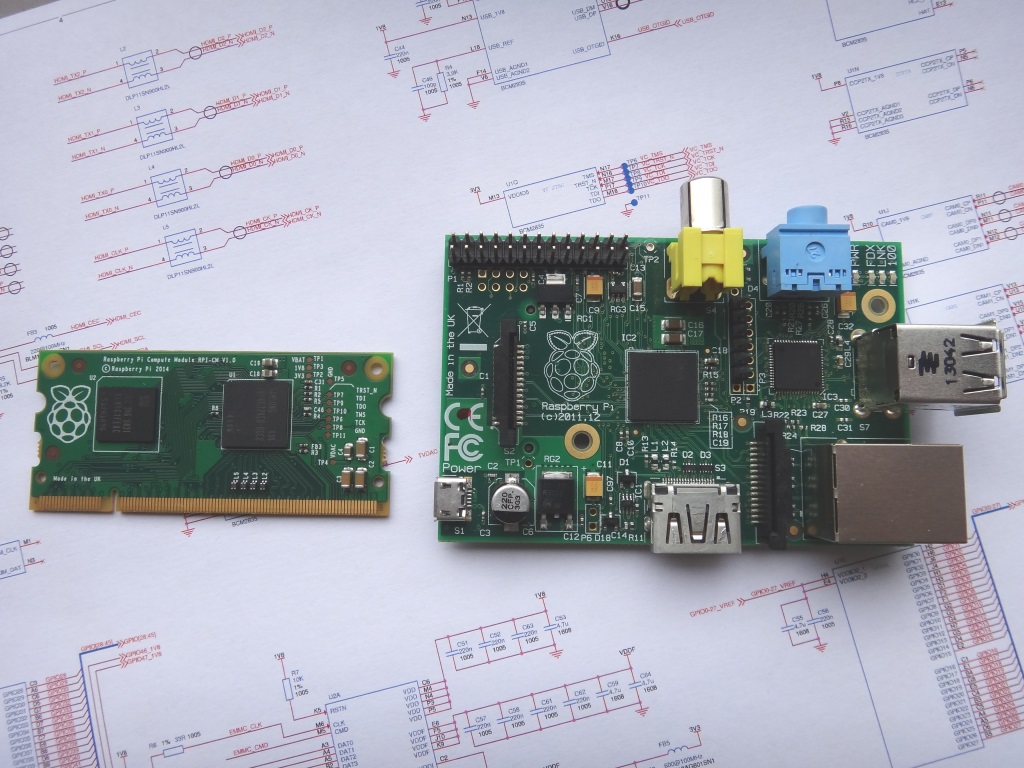

This is a big deal in getting smaller. Trying to make small devices based on the PI is always limited by the connectors and adapters.
Now we can make custom PCB's that are far simpler then implementing a CPU system that just does our sensors and I/O.
PCB Express should do well from this.
Saturday, June 07, 2014
Annikken Andee - Arduino Bluetooth Shield, control a cell phone from Arduino.
http://www.annikken.com/
Arduino Bluetooth Shield , With a twist, it let's you control a cell phone from Arduino.
Supports both iOS and Android with what looks like good example code.
It also supports In Circuit Serial Programming and SD card making it able to store and forward, or store to deal with intermittent connections with any loss in a data collection application.
From the video is seems to have a large delay, that would be almost in the seconds and far too much latency for a driving an RC vehicle.
From what I can tell you use their special App and a library so all the the GUI cell phone user interface is programmed from the Arduino. To do this they must turn the phone in to a slave terminal that responds to push and/or polling?
Looking at Android Library source code right now,
Lots of:
Annikken Andee API Reference
http://resources.annikken.com/index.php?title=Annikken_Andee_API_Reference
Wow, this lets the Arduino have a lot of control over the cell phone.
The website fails to explain what this is doing or how it's working.
http://www.annikken.com/getstarted/
Resources
http://resources.annikken.com/index.php?title=Main_Page
Here is a link to the users manual:
http://annikken.com/wp-content/uploads/2013/09/user_manual.pdf
Some of my favorite lines:
8.3.3.4 Text-To-Speech
Enable this if you want to use Text-To-Speech capability. Arduino can instruct
Android to speak a line of text by using library calls. Here is an example code.
Arduino Bluetooth Shield , With a twist, it let's you control a cell phone from Arduino.
Supports both iOS and Android with what looks like good example code.
It also supports In Circuit Serial Programming and SD card making it able to store and forward, or store to deal with intermittent connections with any loss in a data collection application.
From the video is seems to have a large delay, that would be almost in the seconds and far too much latency for a driving an RC vehicle.
From what I can tell you use their special App and a library so all the the GUI cell phone user interface is programmed from the Arduino. To do this they must turn the phone in to a slave terminal that responds to push and/or polling?
Looking at Android Library source code right now,
Lots of:
void AndeeHelper::setTitleTextColor(char* color){ textAndee("_TTC", color);}
Looks like a heavy protocol over bluetooth.
Annikken Andee API Reference
http://resources.annikken.com/index.php?title=Annikken_Andee_API_Reference
Wow, this lets the Arduino have a lot of control over the cell phone.
You can take pictures, send text messages, of course screen and keyboard control with basic GUI elements, of buttons, sliders, and graphs.
Amazingly there isn't any calls for sending an E-mail or communicating with a web server.
The website fails to explain what this is doing or how it's working.
http://www.annikken.com/getstarted/
Resources
http://resources.annikken.com/index.php?title=Main_Page
Here is a link to the users manual:
http://annikken.com/wp-content/uploads/2013/09/user_manual.pdf
Some of my favorite lines:
8.3.3.4 Text-To-Speech
Enable this if you want to use Text-To-Speech capability. Arduino can instruct
Android to speak a line of text by using library calls. Here is an example code.
Supported Arduino Boards
Annikken Andee (Android and iOS) are compatible with the following boards:
- Arduino Uno
- Arduino Leonardo
- Arduino Mega
- Arduino Due
- Femtoduino
Sunday, June 01, 2014
Friday, May 23, 2014
Saturday, May 10, 2014
9 Tutorials On Raspberry Pi For Beginners
9 Tutorials On Raspberry Pi For Beginners
http://www.electronicsforu.com/newelectronics/articles/hitscc.asp?id=12956&group_type=cool_stuff
From our collection of videos, we bring to you 9 super helpful tutorial videos for Raspberry Pi beginners. Happy making!
Thursday, May 08, 2014
Linux I/O Stack Diagram
The Linux I/O Stack Diagram shows the layout of the the Linux I/O stack.
The current version 1.0 of the diagram refers to Linux Kernel 3.3.

Sent from my iPad
Wednesday, May 07, 2014
CRiOS (Custom Real-time intelligent Operating System)
Been noticing something new. In all my blogs, usually coming in at 1 to 2 percent about 5 the after Firefox, chrome, IE and safari is a new browser CRiOS.
This is the first time I've ever heard of it.
Quick google search isn't clear either but the second entry indicating this could be mobile chrome, makes more sense. Anyone know anything about this?
Cell CRiOS (Custom Real-time intelligent Operating System) is the Operation System (OS) layer which is a proprietary and custom design based on open Linux kernel system version 2.6.x. This OS layer is uniquely with the best technology design to protect against software-based threats, guard the integrity of kernel OS and achieve the best performance.
The meaning of CriOS
Recently have a browser view from "CriOS" when viewing your blogger stats? Basically, what that is is Google Chrome for mobile devices; android and iOS. Not some revolutionary new operating system..
Monday, May 05, 2014
Saturday, May 03, 2014
Linux Video of the Week: Linux Sucks (But Actually It's Awesome)
http://www.linux.com/news/featured-blogs/200-libby-clark/771738-linux-video-of-the-week-linux-sucks-but-actually-its-awesome
Linux Video of the Week: Linux Sucks (But Actually It's Awesome)
In his annual “Linux Sucks” presentation at LinuxFest Northwest last Saturday in Bellingham, Washington, Lunduke unabashedly took aim at some controversial targets – Ubuntu, Fedora, Gnome, Wayland and X, to name a few – while simultaneously praising their accomplishments.
The talk highlights the Linux community's capacity to gripe and moan about the very same software that it faithfully uses and loves. And Lunduke, well aware that he's making himself a target of ridicule, conveys this dual nature well by going through the same set of slides twice: once to discuss how Linux sucks and once to hail how awesome it is. He does this well, with an air of showmanship (and a sprinkling of expletives.) But he ends on a sincere note.
“I think it's absolutely amazing that we have a multi-million person community out there that's rallied around one core set of an operating system, a piece of software, that we feel entirely invested in. For a lot of us it's an identity,” said Lunduke, a social media marketing manager at SUSE (and a guest blogger for Linux.com). “And yet we yell about Linux on Reddit and every other website we get a chance to... and we still at the end of the day love Linux... and each other.”
Monday, April 28, 2014
Thursday, April 10, 2014
Fwd: Heartbleed security update
Begin forwarded message:
From: IVPN <support@ivpn.net>
Date: April 10, 2014, 10:27:01 AM PDT
Subject: Heartbleed security update
Reply-To: IVPN <support@ivpn.net>
Dear customer,
Recently a serious vulnerability in the popular OpenSSL cryptographic software library was disclosed and we'd like to update you on what steps we've taken to ensure your security. In summary, the vulnerability allows an adversary to extract private keys (and session keys) used to encrypt traffic within an OpenVPN connection. This affects not only OpenVPN but many other services such as web, email, instant messaging etc. For more details see the heartbleed website.
Within a few hours of the vulnerability being announced we patched all vulnerable servers and regenerated new 4096 bit certificates across our entire infrastructure. We announced this on twitter at 1:38 PM (CEST) on 8 Apr 2014 - https://twitter.com/ivpnnet/status/453497012647116800 - If you have not yet followed us on Twitter now is a good time to follow @ivpnnet for the latest updates.
What do you need to do?
Whilst our servers are protected there still exists a vulnerability in the OpenVPN client software. Although adversaries are more likely to target a VPN server in an attack we strongly recommend you upgrade your client software to remain secure. OpenVPN technologies have released a new version of the software in the last 24 hours which fixes this vulnerability. If you are using L2TP/IPSec then this issue does not affect you at all. Otherwise if you are using OpenVPN please read the relevant section below:
Max OSX
If you are using the Tunnelblick client you need to update to either v3.3.2 or v3.4 Beta22 depending on whether you are running the stable or beta version. The Beta version is required if you are using the latest version of OSX - 10.9.x Mavericks. If you have automatic updating configured in Tunnelblick you should receive an automatic notice to update on startup. Otherwise, please download and install the latest version from the Tunnelblick downloads page. Instructions for downloading and installing Tunnelblick can be found here.
Windows
If you are using the old Windows client (controlled by right clicking the shield icon in the system tray) you should upgrade to the new IVPN client for Windows v1.1. If you are already using the new IVPN client then click on the 'update' link within the client to upgrade to version 1.1 - the update link should automatically appear in 5 minutes after starting the client. Alternatively if you do not wish to install the new IVPN client you can still install the community edition of the OpenVPN client v2.3.3 - You can follow these instructions on our website to install the community client.
Linux
OpenVPN on Linux uses the openssl libraries installed on your system. Check your distributions website for information and if necessary update openssl using your package manager. Reboot to ensure the new openssl libraries are loaded.
Best regards,
IVPN team

Sunday, April 06, 2014
Saturday, April 05, 2014
Friday, April 04, 2014
Subscribe to:
Posts (Atom)
Comments
Subscribe to Comments Feedvalyum :
Jimmi :
Fbc :